Bus Servo PID Tuning Instructions for Gimbal Applications
Basic Adjustment
The bus servo you receive, or products such as gimbals and robotic arms, have already been configured with the corresponding parameters before leaving the factory. If you need to modify them, for example for a gimbal, start with the parameters in the table below.
Recommended reference values:
| Model | Kp | Ki | Kd |
|---|---|---|---|
| HA/RA8-U25 | 1750 | 1 | 7005 |
| HA/RA8-U25-M | 800 | 0 | 5000 |
| HA/RA8-U25H-M | 400 | 0 | 2000 |
| HP/RP8-U45-M | 320 | 0 | 2500 |
| HP/RP8-U45H-M | 300 | 0 | 700 |
| HX/RX8-U28H-M | 800 | 0 | 80 |
Initial default values:
| Model | Kp | Ki | Kd |
|---|---|---|---|
| HA/RA8-U25 | 800 | 1 | 5000 |
| HA/RA8-U25-M | 800 | 0 | 5000 |
| HA/RA8-U25H-M | 400 | 0 | 2300 |
| HP/RP8-U45-M | 320 | 0 | 1000 |
| HP/RP8-U45H-M | 300 | 0 | 700 |
| HX/RX8-U28H-M | 600 | 0 | 50 |
Writing PID parameters with the servo PC configuration software
-
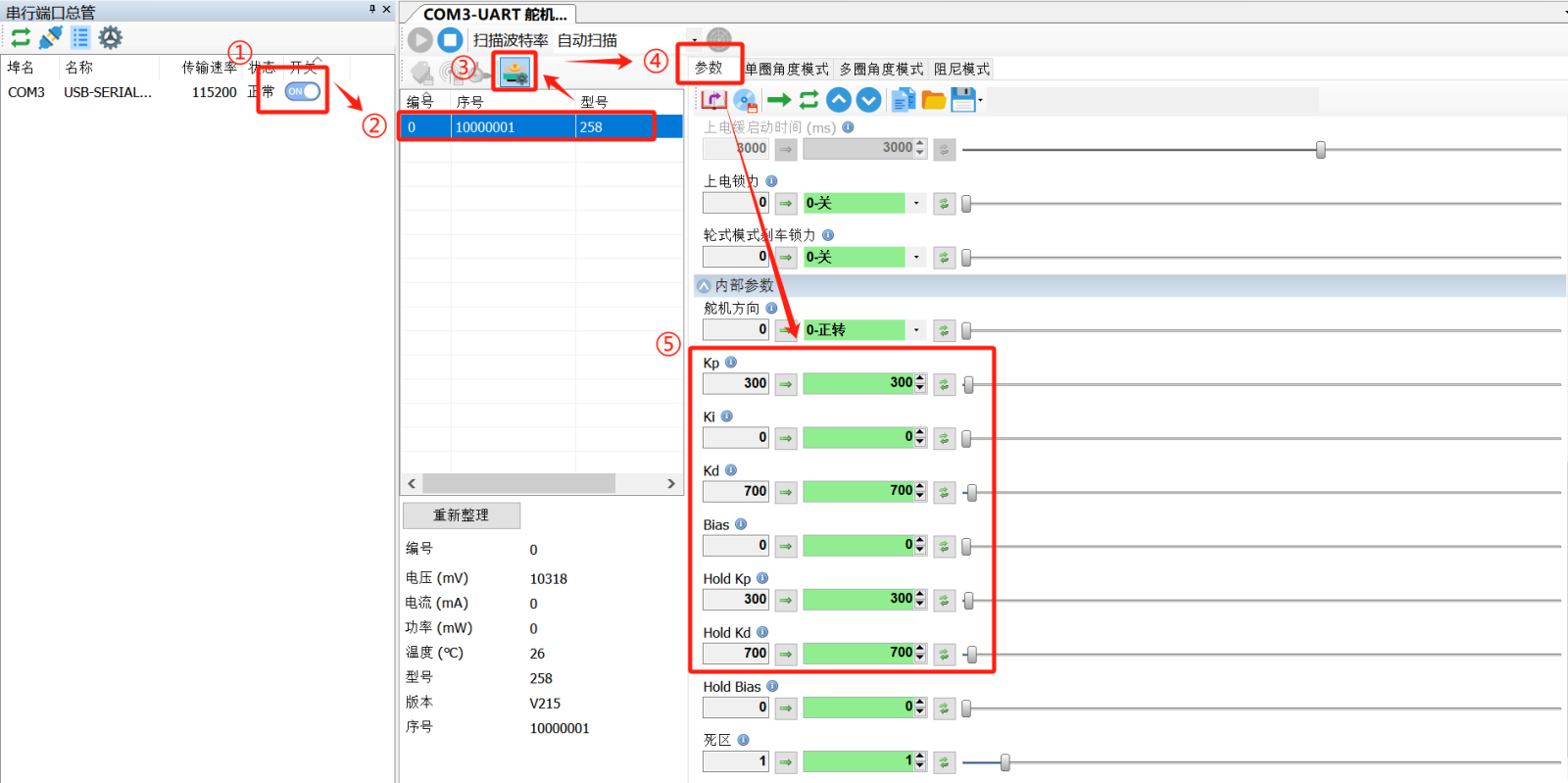
Click in order: ① serial port switch → ② target ID servo → ③ mode selection → ④ parameter options.
-
Expand ⑤ Internal Parameters, then modify the required parameter values.
Important: Make sure Kp is consistent with Hold Kp, and Kd is consistent with Hold Kd.
- Click the Write Parameters button to save the settings. They take effect after power is disconnected and restarted.
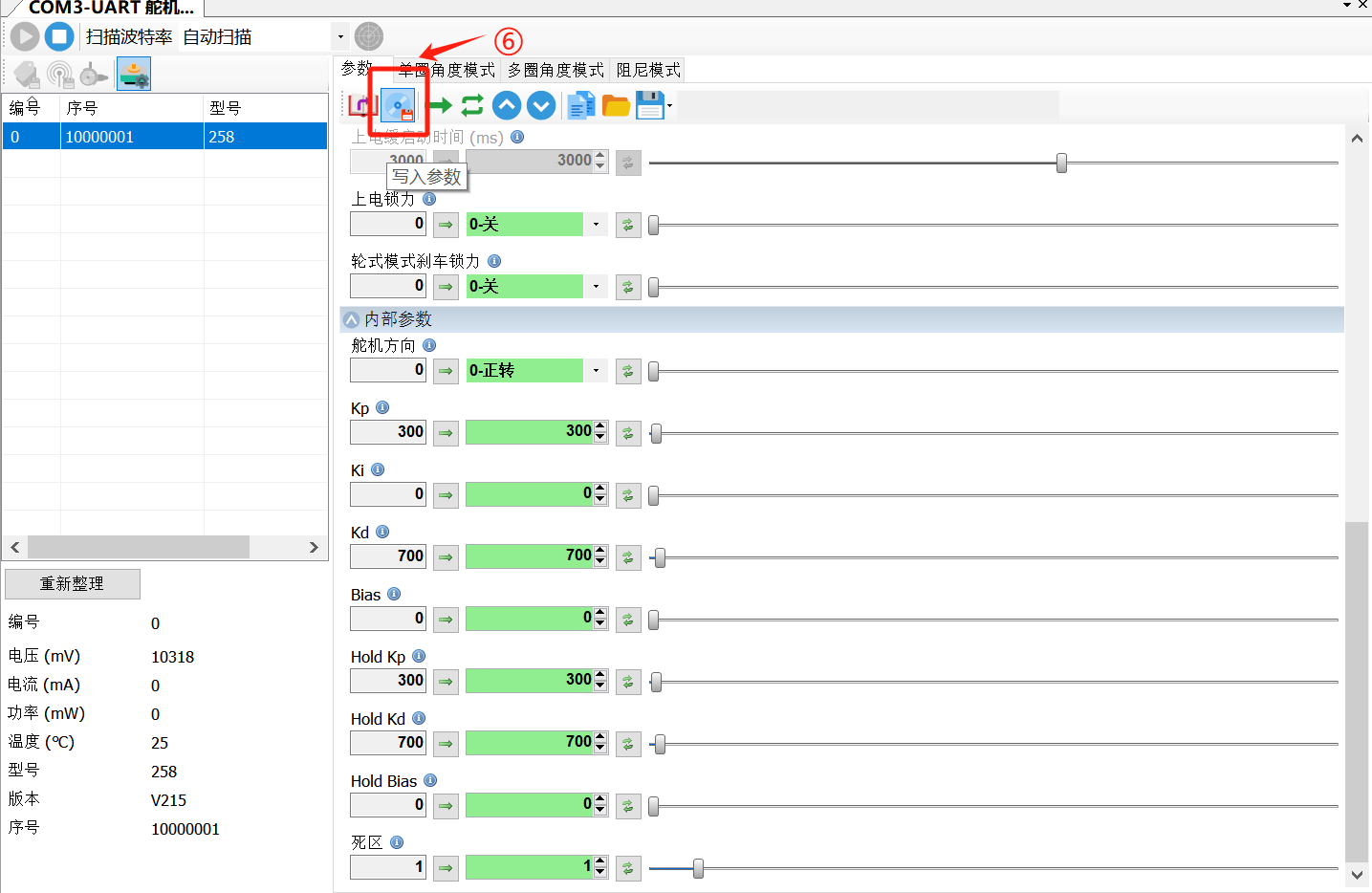
- If writing fails, record the current parameters first, click Stop in multi-turn mode, power on again, and then try writing again.
Advanced Adjustment
1. PID Fundamentals and Tuning Approach
-
Kp (proportional gain) improves response speed and reduces error, but excessive values may cause overshoot and oscillation.
-
Ki (integral gain) eliminates steady-state error, but may cause system oscillation. In most cases, it can be set to 0.
-
Kd (derivative gain) improves system stability and suppresses overshoot, but is sensitive to noise.
Note: This article uses control accuracy as the tuning target. PID parameters vary with different loads. If high accuracy is not required and you only need smooth operation, use the factory default parameters.
2. servo PID Parameter Tuning Recommendations
2.1 Proportional Parameter (Kp) Tuning Steps
-
Set Ki, Hold Ki, Kd, and Hold Kd to 0, keeping only the proportional term.
-
Gradually increase Kp and Hold Kp until the system begins to oscillate slightly.
-
Then gradually reduce the proportional value until the system is stable and no longer oscillates.
-
Record the proportional value at this point, and set the final value to 60% to 70% of it.
2.2 Integral Parameter (Ki) Tuning Recommendations
-
Set it to 0 by default. Consider setting it to 1 only when PD control cannot meet the accuracy requirement.
-
If oscillation or shaking occurs, disable the integral term immediately.
2.3 Derivative Parameter (Kd) Tuning Steps
-
After the proportional term has been tuned and fixed, gradually increase Kd and Hold Kd.
-
When oscillation occurs, gradually reduce the derivative value until the system becomes stable again.
-
Set the final value to about 30% of the non-oscillating value.
3. Notes During Tuning
-
Joint tuning recommendation: Test with no load first, then tune with load, and finally fine-tune the PID values.
-
Combined use: P is required and is usually used together with D or I. Recommended combinations are:
-
PD: prioritizes system stability.
-
PI: prioritizes response speed.
-
PID: balances stability and speed, but is more difficult to tune.
-
Practical experience: In actual use, a two-term combination, such as PD, is often sufficient.
Conclusion
PID tuning is an important way to improve servo system performance. By setting the proportional, integral, and derivative parameters properly, you can achieve the desired control effect under different loads and application scenarios. Tune the configuration items one by one according to the actual operating conditions.
For further technical support, visit https://fashionrobo.com/ or contact the official after-sales team.