Serial Port Assistant
| Version | Supported OS | Package |
|---|---|---|
| 2026.02.14 | Windows | Download |
1. Overview
- Use serial port Assistant to simulate hexadecimal commands sent by different embedded platforms for servo control and data readback.
- Provides multiple hexadecimal control command examples for easier system configuration.
- When the PC configuration software cannot be installed correctly, this method can be used to test basic servo functions.
2. Wiring Preparation
- Download (Serial Port Assistant + Command Generator + Command Examples)
- Follow the diagram below and connect bus servo → TTL/USB Adapter → Computer, then connect power.
![[serial port Assistant] Hex Command servo Control](/wiki/software/servo/images/2024082009113926-1600x1201.jpg)
Notes:
- Install the required driver in advance: CH340G Driver Download (https://www.wch.cn/download/CH341SER_EXE.html)
- Make sure the power supply voltage is within 6.0-8.4V (9.0-12.6V). Otherwise, the servo enters voltage protection and cannot operate.
- Standard AA battery packs are not suitable. Use a regulated power supply or a 2S (3S) Li battery pack.
- Some regulated power supplies have long startup time and may trigger low-voltage protection. Power on first, then connect the servo.
- The factory default ID of each servo is #0. Connect only one servo at a time for configuration. Connect multiple units only after changing their IDs.
- serial port wiring order: TX↔RX, RX↔TX, GND↔GND. The same rule applies to MCU serial port interfaces such as Arduino and STM32.
3. Common Hex Command Examples
Communication Protocol Documentation
3.1 Command Generator
In the attached table below, yellow cells are input fields. Example: servo ID is 0, angle is 90°, time is 1s, and power is 0 (no limit).
![[serial port Assistant] Hex Command servo Control](../images/2024082008585385-1600x77.png)
The generated command is:
12 4C 08 07 00 84 03 E8 03 00 00 DF (servo #0 moves to 90° within 1s)
Generate another command:
12 4C 08 07 00 00 00 E8 03 00 00 58 (servo #0 moves to 0° within 1s)
3.2 Command Examples
![[serial port Assistant] Hex Command servo Control](../images/2024082008590221.png)
The examples here use servo #0. If another ID is used, update both the ID and the checksum.
Example for servo #1: 12 4C 01 01 01 61
4. Using the Serial Port Assistant
The figure shows the operating steps for the serial port Assistant:
![[serial port Assistant] Hex Command servo Control](../images/2024082008594491-1600x845.png)
Actual Demo Video:
5. Status Response Packet Interpretation
5.1 Read Servo Status
When using bus servo, you can send commands to read servo status.
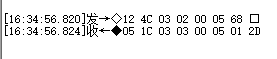
- Example of reading servo status with PC configuration software

- Data field interpretation for the servo status read example
Request packet: 0x12 0x4c 0x03 0x02 0x00 0x05 0x68
| Field | Value |
|---|---|
| Header | 0x12 0x4c |
| servo Read Command ID | 0x03 |
| Command Length | 0x02 |
| servo ID | 0x00 |
| servo Status Read Number | 0x05 |
| Checksum | 0x68 |
Response packet: 0x05 0x1c 0x03 0x03 0x00 0x05 0x01 0x2d
| Field | Value |
|---|---|
| Header | 0x05 0x1c |
| servo Read Command ID | 0x03 |
| Command Length | 0x03 |
| servo ID | 0x00 |
| servo Status Read Number | 0x05 |
| servo Status Indicator | 8-bit data BIT[0]-BIT[7]. Command executing: BIT[0] set to 1; command error: BIT[1] set to 1; stall error: BIT[2] set to 1; over-voltage: BIT[3] set to 1; under-voltage: BIT[4] set to 1; current error: BIT[5] set to 1; power error: BIT[6] set to 1; temperature error: BIT[7] set to 1. Example: 0x01 means the servo is executing a command. |
| Checksum | 0x2d |
5.2 Data Monitoring
When using bus servo, you can send commands to read servo voltage, current, power, temperature, status, angle, and turns.
- PC configuration software data monitoring example

- Data monitoring field interpretation
Request packet: 0x12 0x4c 0x16 0x01 0x00 0x75
| Field | Value |
|---|---|
| Header | 0x12 0x4c |
| servo Read Command ID | 0x16 |
| Command Length | 0x01 |
| servo ID | 0x00 |
| Checksum | 0x75 |
Response packet: 0x05 0x1c 0x16 0x10 0x00 0xff 0x2e 0x0e 0x00 0xa8 0x00 \ 0x30 0x07 0x01 0x01 0x00 0x00 0x00 0x00 0x00 0x63
| Field | Value |
|---|---|
| Header | 0x05 0x1c |
| servo Read Command ID | 0x16 |
| Command Length | 0x10 |
| servo ID | 0x00 |
| Voltage | 0x2e 0xff = 12031mV |
| Current | 0x00 0x0e = 14mA |
| Power | 0x00 0xa8 = 168mW |
| Temperature | 0x07 0x30 = 1840 (ADC value) |
| Status | 0x01 = 1 (command executing) |
| Angle | 0x00 0x00 0x00 0x01 = 1 (0.1 degrees) |
| Turns | 0x00 0x00 = 0 |
| Checksum | 0x63 |