Bus Servo SDK User Manual (C#)
| 适用协议 | 版本 | GitHub | 开发资源包 |
|---|---|---|---|
| UART/RS-485 全系列 | v1.2026.0214 |  |
点击下载 |
1. Introduction
1.1 Namespace
using BrightJade;

using BrightJade.Serial;

using FashionStar.Servo.Uart;

using FashionStar.Servo.Uart.Protocol;
1.2 Definitions and Declarations
// Serial Port 管理器。
private SerialPortManager _serialPortManager;
// 舵机控制器。
private ServoController _servoController;

_serialPortManager = new SerialPortManager();
_servoController = new ServoController(_serialPortManager);
2. Writing Code
2.1 Serial Port Manager
2.1.1 SerialSettings Object
SerialPortManager wraps and manages the transmit and receive behavior of the SerialPort object. It also has a member named CurrentSerialSettings of type SerialSettings, which stores related information.
2.1.2 Initialization
When SerialPortManager is created, it searches for all available Serial Ports on the current device and stores the list in CurrentSerialSettings.PortNameCollection.
The first element is assigned to CurrentSerialSettings.PortName. At the same time, according to the selected Baud, the available Baud list is updated in CurrentSerialSettings.BaudRateCollection. You can call it yourself according to implementation needs.
Other parameters usually remain at their initial values under normal conditions. If needed, refer to and call them yourself.
2.1.3 Reference Examples
The following is an initialization example:
// Serial Port 管理器。
private SerialPortManager _serialPortManager;
// 舵机控制器。
private ServoController _servoController;

_serialPortManager = new SerialPortManager();
_servoController = new ServoController(_serialPortManager);

// 接收事件。
_servoController.ReadAngleResponsed += OnReadAngleResponsed;
_servoController.ReadMultiTurnAngleResponsed += OnReadMultiTurnAngleResponsed;
_serialPortManager.ErrorOccured += OnErrorOccured;
In the Click event of a button:
// 开始监听。
_servoController.StartListening();
In the Click event of a button:
// 读取角度,结果将回传至回呼 OnReadAngleResponsed。
_servoController.ReadAngle((byte)_numServoID.Value);
In the Click event of a button:
// 停止监听
_servoController.StopListening();
2.2 Servo Controller Methods and Events
The methods of the servo controller can be regarded as Tx request packets, and events can be regarded as Rx response packets.
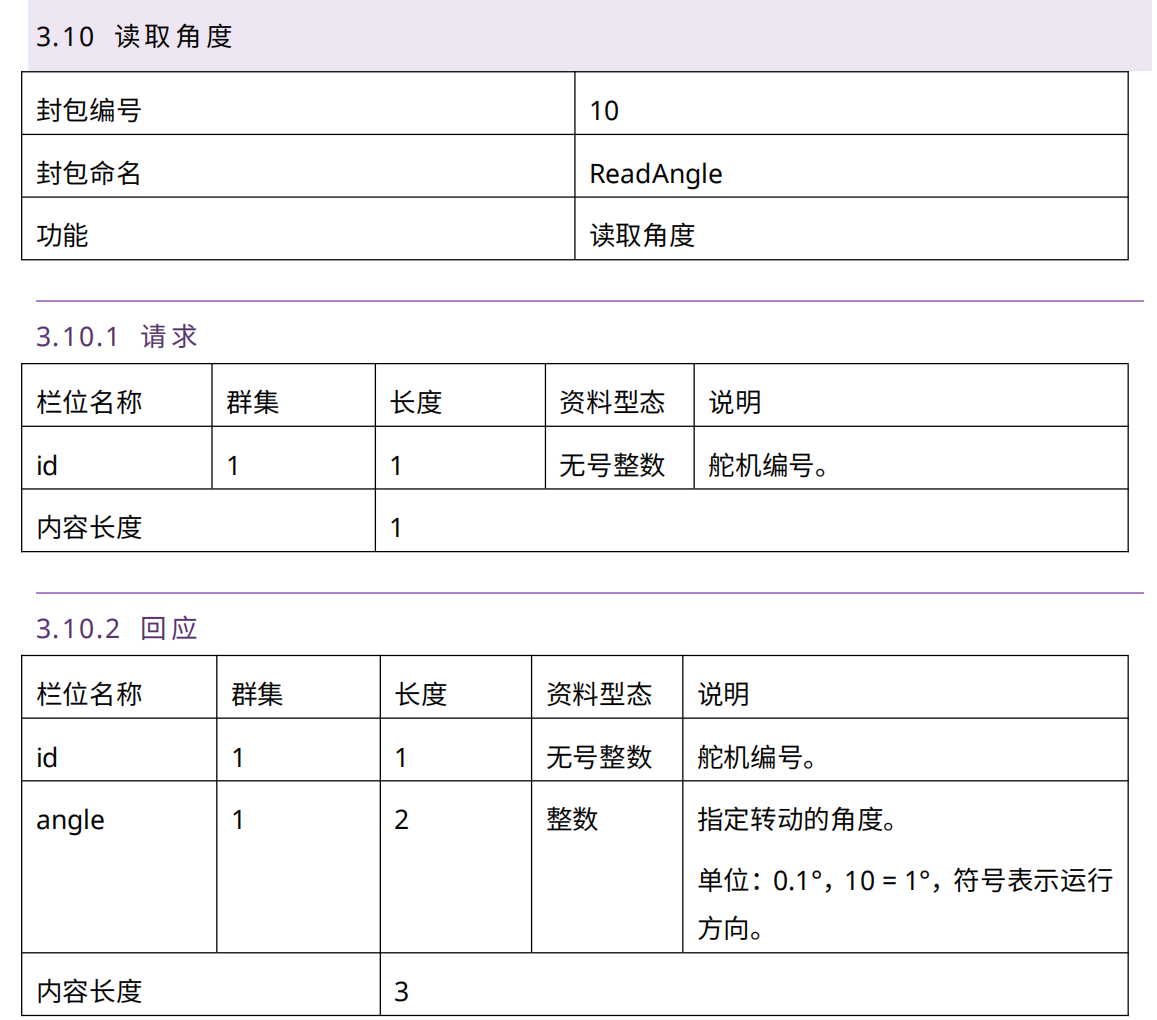
Refer to the document: Standard Protocol servo Communication Packet Definition Table. Call the method with the same name as the packet as the request, and receive the event with the Responsed suffix as the servo information response.
For example, for the ReadAngle packet shown above, call the ReadAngle() method of the servo controller object to query the angle from the servo.
_servoController.ReadAngle((byte)_numServoID.Value);
Receive the ReadAngleResponsed event to process the returned angle value.
2.3 Multithreaded Processing
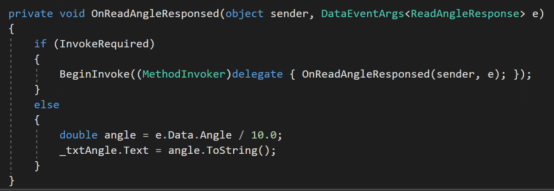
The events of the servo controller are not on the same thread as the UI, so extra processing is required, as shown below:
Reference: https://fashionstar.com.cn/wp-content/uploads/download/uart-servo-protocol-SC-20210121.pdf